
By Glend MaatitaUpdated
What is Semantic Versioning?
Semantic versioning, or SemVer, is a standardized way of numbering software releases so anyone can tell at a glance what changed and whether an update is backward-compatible. This guide explains what SemVer is, where it came from, how to implement it, and how it compares to other versioning schemes.
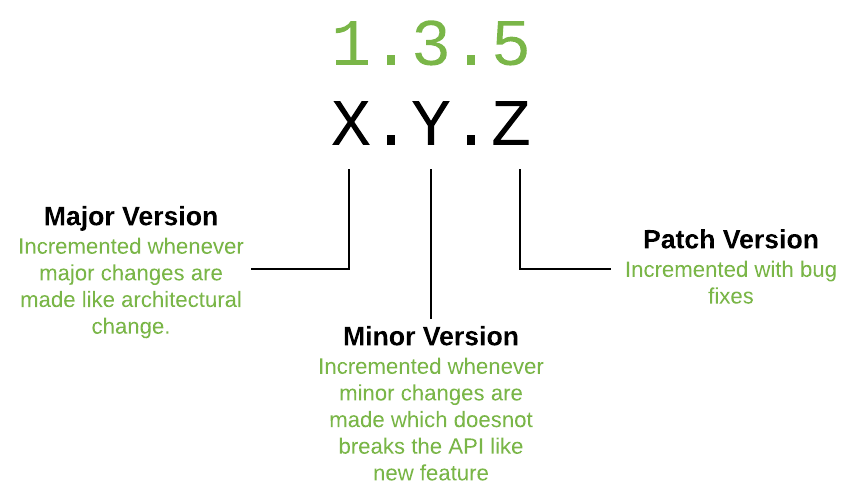
Semantic versioning, or SemVer, is a vital convention in software development that streamlines how projects are versioned, updated, and depended upon. Instead of arbitrary version numbers, it gives every release a number that communicates exactly what kind of change it contains.
Below, we explain what SemVer is, where it came from, how to implement it in practice, its benefits, and how it compares to other versioning systems like calendar versioning.
What is Semantic Versioning (SemVer)?
Semantic versioning is a standardized system that assigns version numbers in the format MAJOR.MINOR.PATCH, where each part signals a different level of change. The MAJOR number increases when a release makes breaking or incompatible changes, the MINOR number increases when it adds new features that are backward-compatible, and the PATCH number increases for bug fixes or small changes that keep backward compatibility.
On top of the core number, SemVer supports pre-release and build metadata that add detail about a release's stage or build environment, such as 1.0.0-beta for a pre-release or 1.0.0+build.123 to record build information.
The origins of SemVer
Before SemVer, software versioning often lacked consistency, which led to confusion and miscommunication between developers and users. Semantic versioning emerged as a standardized, easily understood answer, built around one key principle: backward compatibility, so updates and new features do not break existing functionality.
It was first proposed by Tom Preston-Werner, co-founder of GitHub, in 2009, with the goal of a simple and consistent system that would improve collaboration and communication among developers. SemVer.org was created to provide guidelines and resources, and the standard quickly gained traction and is now widely adopted across the industry.
Why SemVer became popular
SemVer caught on because its format is simple and immediately readable, so developers and users can grasp the nature of a change from the version number alone. That shared convention improves collaboration and communication, since changes are described in a way everyone already understands.
It also simplifies dependency management by clearly signalling which versions of a package are compatible, which is why package managers like npm and repositories like Maven have adopted it. Popular projects such as Angular, React, and Node.js version their releases with SemVer, and it is especially valued in open-source communities, where clear, transparent communication between contributors matters most.
How to implement SemVer
For a new project, begin at version 0.1.0 during initial development and bump the MINOR and PATCH numbers as you add features and fix bugs. Once the project is stable and production-ready, increment the MAJOR version to 1.0.0. To migrate an existing project, analyze your current scheme, map it to the MAJOR.MINOR.PATCH format, and document a clear conversion plan.
The rules are consistent: a breaking change always increments MAJOR, a backward-compatible feature increments MINOR, and a bug fix increments PATCH. A few edge cases are worth remembering. Reverting a breaking change is itself a compatibility change, so it increments MAJOR. Deprecating a feature increments MINOR and should come with clear documentation. And when a single release contains several kinds of change, you increment the component that matches the most significant one.
Benefits of SemVer
For teams, SemVer makes project management more efficient by giving everyone a clear, standardized way to track and communicate changes. It makes software updates easier, because following the rules keeps updates backward-compatible and minimizes the risk of breaking changes, and it streamlines dependency management by spelling out compatibility between versions.
For users, it builds trust: anyone can look at a new version number and understand what upgrading means for them, which fosters confidence in the software.
SemVer vs CalVer vs Romantic Versioning
SemVer is not the only way to version software, but it is distinguished by its focus on backward compatibility and clear communication of change, which makes it well suited to software libraries and APIs like React and Node.js.
Calendar Versioning (CalVer) instead encodes a date, such as YY.MM, which suits time-sensitive projects with regular, scheduled releases, like Ubuntu. Romantic Versioning uses descriptive names or phrases rather than numbers, which fits creative projects where thematic naming matters more than signalling compatibility. Where SemVer offers high clarity of changes and simplified dependency management, CalVer and romantic versioning trade that away for timestamps or expressive names.
How 8grams uses SemVer
At 8grams, we version the software and libraries we build with SemVer so our clients and their teams always know what a release contains and whether it is safe to adopt. Combined with clear release notes, it keeps dependencies predictable and upgrades low-risk.
Key takeaways
- SemVer numbers releases as MAJOR.MINOR.PATCH: MAJOR for breaking changes, MINOR for backward-compatible features, and PATCH for bug fixes.
- It was proposed by GitHub co-founder Tom Preston-Werner in 2009 and is built around backward compatibility.
- Pre-release and build metadata (like 1.0.0-beta or 1.0.0+build.123) add detail about a release's stage.
- SemVer simplifies dependency management and is widely adopted by package managers and projects like npm, React, and Node.js.
References & further reading
Common questions.
What is Semantic Versioning (SemVer)?
Semantic Versioning is a standardized system for numbering software releases in the format MAJOR.MINOR.PATCH, where each part signals whether a release contains breaking changes, backward-compatible features, or bug fixes.
What do MAJOR, MINOR, and PATCH mean in SemVer?
MAJOR increments for breaking or incompatible changes, MINOR increments for new features that are backward-compatible, and PATCH increments for bug fixes or small changes that keep backward compatibility.
Who created Semantic Versioning?
Semantic Versioning was proposed by Tom Preston-Werner, co-founder of GitHub, in 2009. SemVer.org was later created to provide guidelines and resources for adopting it.
When should you increment the MAJOR version?
You increment the MAJOR version whenever a release introduces a breaking or incompatible change. Reverting a previous breaking change also counts as a compatibility change and increments MAJOR.
What is a pre-release version in SemVer?
A pre-release version marks a release that is not yet stable, denoted with a hyphen and an identifier, such as 1.0.0-beta. It signals that the version is available for testing but may still change before the final release.
What does build metadata like 1.0.0+build.123 mean?
Build metadata is extra information about the build environment, added after a plus sign, such as 1.0.0+build.123. It does not affect version precedence and is used only to identify a specific build.
What version should a new project start at?
A new project typically starts at 0.1.0 during initial development, bumping MINOR and PATCH as it evolves. Once it is stable and production-ready, you release version 1.0.0.
What is the difference between SemVer and CalVer?
SemVer uses MAJOR.MINOR.PATCH to communicate the nature of changes and backward compatibility, ideal for libraries and APIs. CalVer encodes a date, such as YY.MM, and suits time-sensitive projects with scheduled releases, like Ubuntu.
Why is SemVer important for dependency management?
Because the version number signals compatibility, tools and developers can safely decide which updates to accept. This lets package managers like npm resolve dependencies and avoid pulling in a version with breaking changes.
Is version 1.0.0 significant in SemVer?
Yes. Reaching 1.0.0 signals that a project is stable and production-ready, and from that point the backward-compatibility rules apply strictly, so users can rely on what each future version number means.
Related concepts.
Working on something like this?
Tell us about your project and we'll get back to you within one business day.
Talk to 8grams