
By Glend MaatitaUpdated
What is Documentation as Code?
Documentation as Code (DaaC) is an approach that treats documentation as an integral part of the codebase, written by engineers, versioned in Git, reviewed, and tested in the same pipeline as the code. This guide explains what it means, why teams adopt it, and the tools that make it work.
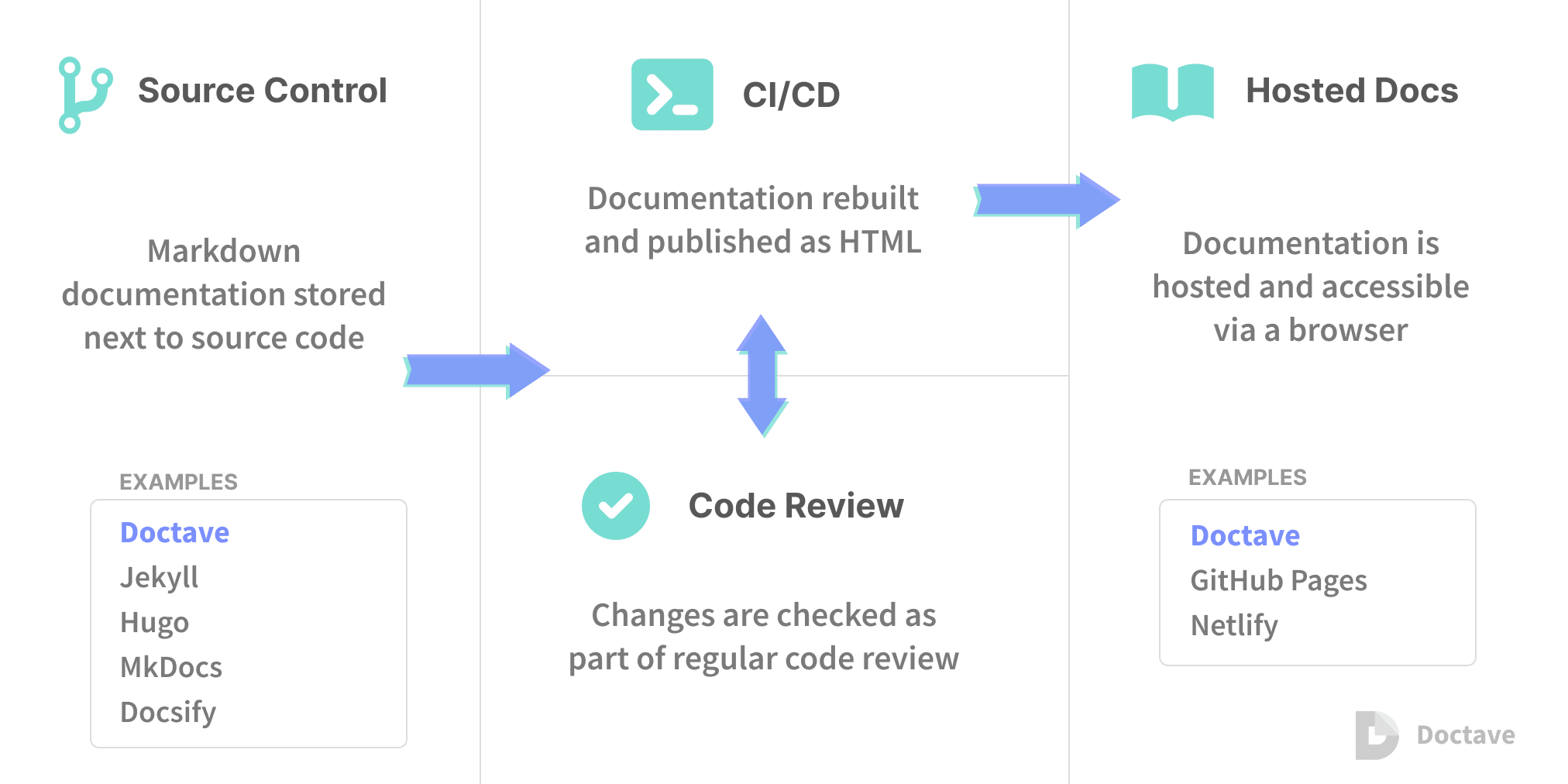
Documentation as Code (DaaC) is an approach that treats documentation as an integral part of the code. Instead of living in a disconnected wiki, docs are written by engineers, stored in version control, reviewed like a pull request, and validated automatically in the build pipeline.
“The only thing worse than no documentation is bad documentation.”
It sounds simple, but it changes everything about how documentation gets written and maintained. Below, we explain what DaaC is, why documentation so often goes stale, how DaaC fixes it, and the tools and practices that bring it to life.
What is Documentation as Code?
Documentation as Code (DaaC) is the practice of managing documentation with the same tools and workflows engineers already use for source code: version control, code review, automated testing, and CI/CD pipelines.
In practice, that means documentation is stored alongside the code it describes, tracked in Git, reviewed before it is merged, and checked automatically for format and validity. Documentation stops being an afterthought in a separate system and becomes a first-class part of the software itself.
Why do engineers skip documentation?
Ask anyone whether documentation is important and the answer is almost always yes, yet even engineers who value it are rarely obsessed with writing it. Part of the reason is that documentation feels like extra work: because docs are treated as separate from code, writing them looks like a burden layered on top of an engineer's real job.
The other part is a quiet assumption that documentation is the technical writer's job. That is only half true, since some docs, such as reference documentation and docstrings, can only be written by the engineer who built the feature. The result is documentation that is outdated, incomplete, or missing entirely, which slowly erodes the quality and maintainability of the software.
How Documentation as Code works
DaaC closes the gap between the value of documentation and the reality of how it gets written by declaring one thing: documentation is part of the code. That single statement changes how docs are treated. Writing them becomes an engineer's responsibility rather than an optional extra, and the docs live in version control right next to the code they describe.
From there, documentation is checked and tested for format and validity inside the build pipeline, exactly as code is, and aggregated into a single portal the whole team can browse and review. When documentation is missing or non-compliant, it is treated as a bug: logged in the tracker, assigned to an engineer, fixed, and checked again before it is considered done.
Benefits of Documentation as Code
Treating documentation as code produces the same quality gains you get from good engineering practice. Version control and code review let the whole team create and maintain docs together instead of one person owning a stale wiki, and because the docs are part of the development process, they stay current rather than drifting out of date.
It also improves communication beyond the engineering team. A centralized, searchable portal bridges the gap between engineers and non-technical stakeholders like product managers and designers, and everyone reads the same reviewed, versioned source of truth.
Documentation as Code tools
DaaC reuses the tools teams already have for source code. Git and a platform like GitLab or GitHub host the documentation, run the reviews, and build it in the same CI/CD pipeline as the code. Docstrings are enforced with a linter such as pydocstyle, which checks that every module and function is documented in the correct format and fails the build if coverage drops below a set threshold.
A generator like Sphinx then turns those docstrings into browsable HTML, which can be built into an image and deployed to an internal subdomain. To bring everything into one place, a documentation portal built with Docsify, or a static site generator such as MkDocs, Hugo, or Jekyll, renders Markdown into a hosted site the whole team can read. Finally, a bug tracker like Redmine records any invalid, expired, or incorrect documentation as an issue, with a dedicated tracker per project.
Documentation as Code best practices
A few simple policies make DaaC stick. At 8grams we follow an unwritten rule that a merge request is not approved or merged while required docstrings are missing, and every engineer is expected to write a clear description, covering the idea, the concept, and an implementation example, when they build a feature.
Two habits keep the standard from slipping: keep documentation in the same repository as the code it describes so the two evolve together, and treat a documentation failure as a build failure rather than a nice-to-have.
How 8grams applies Documentation as Code
The payoff is documentation you can trust. Because it is versioned, reviewed, and tested like code, it stays accurate as the codebase grows, and new engineers can onboard from a single source of truth instead of piecing together tribal knowledge.
Key takeaways
- Documentation as Code (DaaC) manages docs with the same tools as source code: version control, review, testing, and CI/CD.
- It fixes stale and missing docs by making documentation an engineer's responsibility and part of the pipeline.
- Non-compliant documentation is treated as a bug, tracked, assigned, fixed, and re-checked.
- Typical tools include Git, docstring linters, Sphinx, and static site generators like Docsify, MkDocs, or Hugo.
References & further reading
Common questions.
What is Documentation as Code (DaaC)?
Documentation as Code is the practice of writing, storing, reviewing, and testing documentation with the same tools and workflows used for source code, version control, code review, and CI/CD pipelines. Docs live next to the code and are treated as a first-class part of the software.
Why treat documentation as code?
Because it keeps docs accurate. When documentation is versioned, reviewed, and validated in the build pipeline like code, it stays in sync with the software instead of drifting out of date in a separate wiki.
What is the difference between Documentation as Code and a wiki?
A wiki is edited separately from the code and easily goes stale. Documentation as Code lives in the same repository, follows the same review process, and is tested automatically, so it evolves together with the code it describes.
What tools are used for Documentation as Code?
Common tools include Git and GitLab/GitHub for version control and CI, docstring linters like pydocstyle, generators like Sphinx, static site generators like Docsify, MkDocs, Hugo, or Jekyll, and issue trackers like Redmine or Jira for documentation bugs.
Does Documentation as Code replace technical writers?
No. Technical writers still add enormous value for guides and user-facing content. DaaC simply makes engineers responsible for the docs only they can write, reference docs and docstrings, and gives everyone one reviewed source of truth.
How do you test documentation?
You lint it for format and coverage (for example, failing the build if docstring coverage drops below a threshold), check links and structure, and treat any non-compliant documentation as a bug that must be fixed before merging.
What is a docstring?
A docstring is documentation written directly in the source code to describe a module, class, or function. Tools can enforce their format and coverage and generate browsable HTML documentation from them.
Can non-developers contribute to Documentation as Code?
Yes. Because most DaaC content is written in Markdown and published to a portal, product managers, designers, and other stakeholders can read it easily and, with a light Git workflow, contribute edits too.
Is Documentation as Code only for APIs?
No. It works for API references, architecture docs, runbooks, onboarding guides, and internal knowledge bases, anything that benefits from being versioned, reviewed, and kept in sync with the code.
How do you get started with Documentation as Code?
Start by moving docs into the code repository, adding a docstring or Markdown linter to your CI pipeline, publishing a documentation portal with a static site generator, and making missing or invalid docs block a merge, then expand from there.
Related concepts.
Working on something like this?
Tell us about your project and we'll get back to you within one business day.
Talk to 8grams