NGINX: Introduction to The Most Popular Ingress Controller in Kubernetes World
By 8grams Tech
There are many Ingress Controllers available, such as HAProxy, Traefik, and Istio. One of the most popular and widely used controllers is NGINX.
Introduction
Hey there, fellow tech enthusiasts! Today, we're going to have a laid-back discussion about Ingress and Ingress NGINX in the world of Kubernetes. We'll explore what Ingress is, its role in Kubernetes clusters, and why we'd want to use Ingress NGINX. So, sit back, relax, and let's roll in!
What is Ingress?
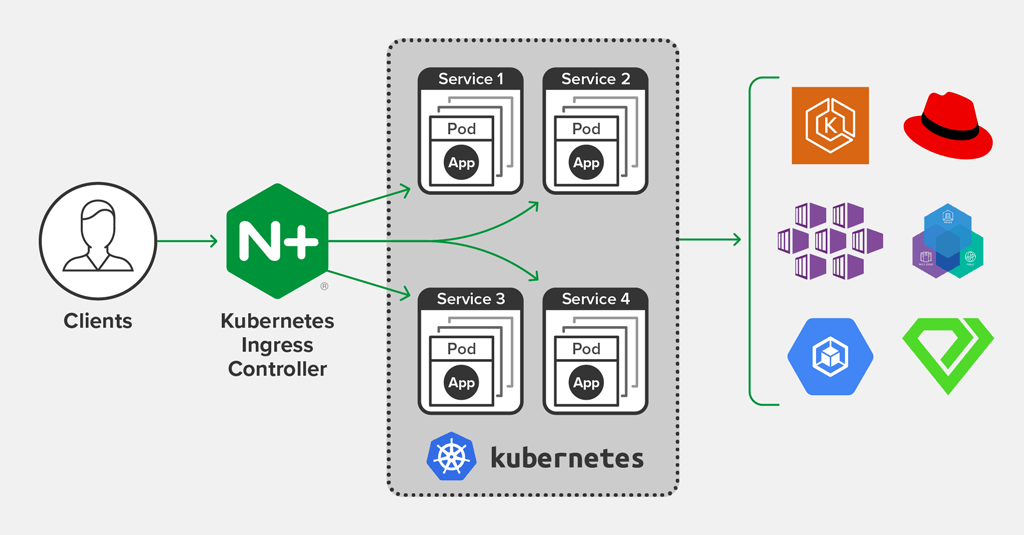
Ingress in Kubernetes
In Kubernetes, Ingress is an essential component that helps manage external access to the services running within a cluster. Think of it as a gateway or entry point that controls and routes traffic from outside the cluster to the right services inside it. Ingress lets you define rules and policies for routing external traffic, which can be pretty useful for load balancing, SSL termination, and name-based virtual hosting.
The role of Ingress in Kubernetes clusters
A Kubernetes cluster can have multiple services running, and each service might expose an API or serve web content. So, without Ingress, we would need to expose each service with a separate external IP address, which is not ideal.
Ingress simplifies this process by providing a single point of entry for external traffic. It listens for incoming requests on specific ports or domains and routes them to the right services based on the predefined rules. This way, you can expose multiple services using a single external IP address.
For example, let's say you have two services, one for an online store (store.example.com) and another for a blog (blog.example.com). You can create an Ingress resource that routes incoming traffic based on the requested hostnames to the appropriate services.
Why Ingress Nginx?
The need for an Ingress Controller
Ingress resources in Kubernetes don't do the magic all by themselves. They need an Ingress Controller to implement the actual routing rules. An Ingress Controller is a component that watches for Ingress resources and updates the underlying routing infrastructure based on the defined rules.
There are many Ingress Controllers available, such as HAProxy, Traefik, and Istio. However, one of the most popular and widely used controllers is NGINX.
Advantages of Ingress NGINX
Ingress NGINX is a popular choice for several reasons:
- Performance: NGINX is known for its high performance and ability to handle a massive number of concurrent connections with minimal resource consumption.
- Flexibility: Ingress NGINX allows you to easily customize and extend its functionality using annotations, ConfigMaps, and custom templates.
- Community support: As a widely used Ingress Controller, Ingress NGINX has an extensive and active community. This means you can easily find support, solutions, and examples when you need help.
- Ease of use: Setting up and configuring Ingress NGINX is straightforward, making it an excellent choice for those just getting started with Kubernetes.
Setting up Ingress NGINX in Your Kubernetes Cluster
Deploying Ingress NGINX using Helm
Before proceeding with the installation of NGINX on your Kubernetes cluster, it's important to ensure that Helm is installed and properly configured. Helm is a package manager for Kubernetes, which simplifies the deployment and management of applications on a cluster. In this guide, we will be using the official NGINX Helm chart.
Add Helm Chart
~$ helm repo add ingress-nginx https://kubernetes.github.io/ingress-nginx
~$ helm repo update
Create Helm values file
Install to cluster
~$ helm install ingress-nginx ingress-nginx/ingress-nginx --namespace ingress-nginx --version 4.2.5 --values deployment.yaml --create-namespaceVerifying Ingress Nginx installation
To verify that Ingress Nginx is running, you can check the pods in the ingress-nginx namespace:
~$ kubectl get pods --namespace=ingress-nginx

NAME          READY   STATUS    RESTARTS   AGE
ingress-...   1/1     Running   0          16d
Configuring Ingress NGINX
Example of basic Ingress configuration
These examples will show how Ingress NGINX is really easy to customize
- Defining routing rules
Create a simple Ingress resource that routes traffic based on the host:
- Using Load balancing algorithms
Configure the load balancing algorithm using thenginx.ingress.kubernetes.io/load-balanceannotation:
- Rewrites and redirects
To rewrite or redirect requests
- Adding Basic Auth
Create username and password for Basic Auth
~$ htpasswd -c auth myusername
~$ kubectl create secret generic basic-auth-secret --from-file=auth
Implement to Ingress
About 8grams
We are a small DevOps Consulting Firm that has a mission to empower businesses with modern DevOps practices and technologies, enabling them to achieve digital transformation, improve efficiency, and drive growth.
Ready to transform your IT Operations and Software Development processes? Let's join forces and create innovative solutions that drive your business forward.
Subscribe to our newsletter for cutting-edge DevOps practices, tips, and insights delivered straight to your inbox!
Frequently Asked Questions
What is NGINX used for?
NGINX is a high-performance web server widely used as a reverse proxy, load balancer, and Ingress Controller in Kubernetes. It handles a massive number of concurrent connections with minimal resource consumption. In Kubernetes, Ingress NGINX watches Ingress resources and routes external HTTP and HTTPS traffic to the correct internal services based on defined rules.
What is Ingress in Kubernetes?
Ingress in Kubernetes is a resource that manages external access to services within a cluster. It acts as a gateway that routes incoming traffic to the right services based on rules such as hostnames or paths. Ingress enables load balancing, SSL termination, and name-based virtual hosting, letting you expose multiple services through a single external IP address.
Why use Ingress NGINX over other Ingress Controllers?
Ingress NGINX is a popular choice for its performance, flexibility, community support, and ease of use. NGINX handles many concurrent connections efficiently, and you can customize routing with annotations, ConfigMaps, and templates. Its large, active community makes support and examples easy to find, and its straightforward setup suits teams new to Kubernetes compared to HAProxy, Traefik, or Istio.
How do you install Ingress NGINX on Kubernetes?
Install Ingress NGINX using its official Helm chart. Add the repository with helm repo add ingress-nginx, update it, then run helm install ingress-nginx ingress-nginx/ingress-nginx into a dedicated namespace with a values file. Verify the deployment by checking that the pods in the ingress-nginx namespace are running before creating Ingress resources.
How do you add basic authentication to an NGINX Ingress?
Add basic auth to an NGINX Ingress by creating an htpasswd file with htpasswd -c auth myusername, then storing it as a Kubernetes secret with kubectl create secret generic. Reference that secret in your Ingress using the appropriate nginx.ingress.kubernetes.io annotations, which prompts users for credentials before NGINX routes traffic to the backend service.
A shirt from a famous season can become a shortcut to remembering goals and rivalries because matchday clothing can express loyalty without needing many words. Collectors interested in Ajax often look at how different seasons changed the shape and details of the shirt. For fans choosing a shirt connected to a favourite side, Serie A football shirts is one way to link football history with the practical choice of a shirt. That perspective shows why home, away, and third kits can each appeal in different ways.